Free PNG to SVG Converter for Laser Cutting
Upload a PNG or JPG and get a layered, laser-ready SVG — red cut outline plus black engrave layer, separated automatically. Need the colors? Switch to Color for a full-color SVG with one layer per color. Free to use, nothing to install.
Click to upload your PNG or JPG
High-contrast images (logos, line art, clip art) trace best
What the conversion actually does
A 1254px PNG traced into a layered SVG. The red line is the cut — it follows the real silhouette, right out to the antler tips, not a bounding box — and the black is the engrave layer. Side by side at this size the two look the same; the bottom row is the same antler tine magnified, where the pixels run out and the vector doesn't.
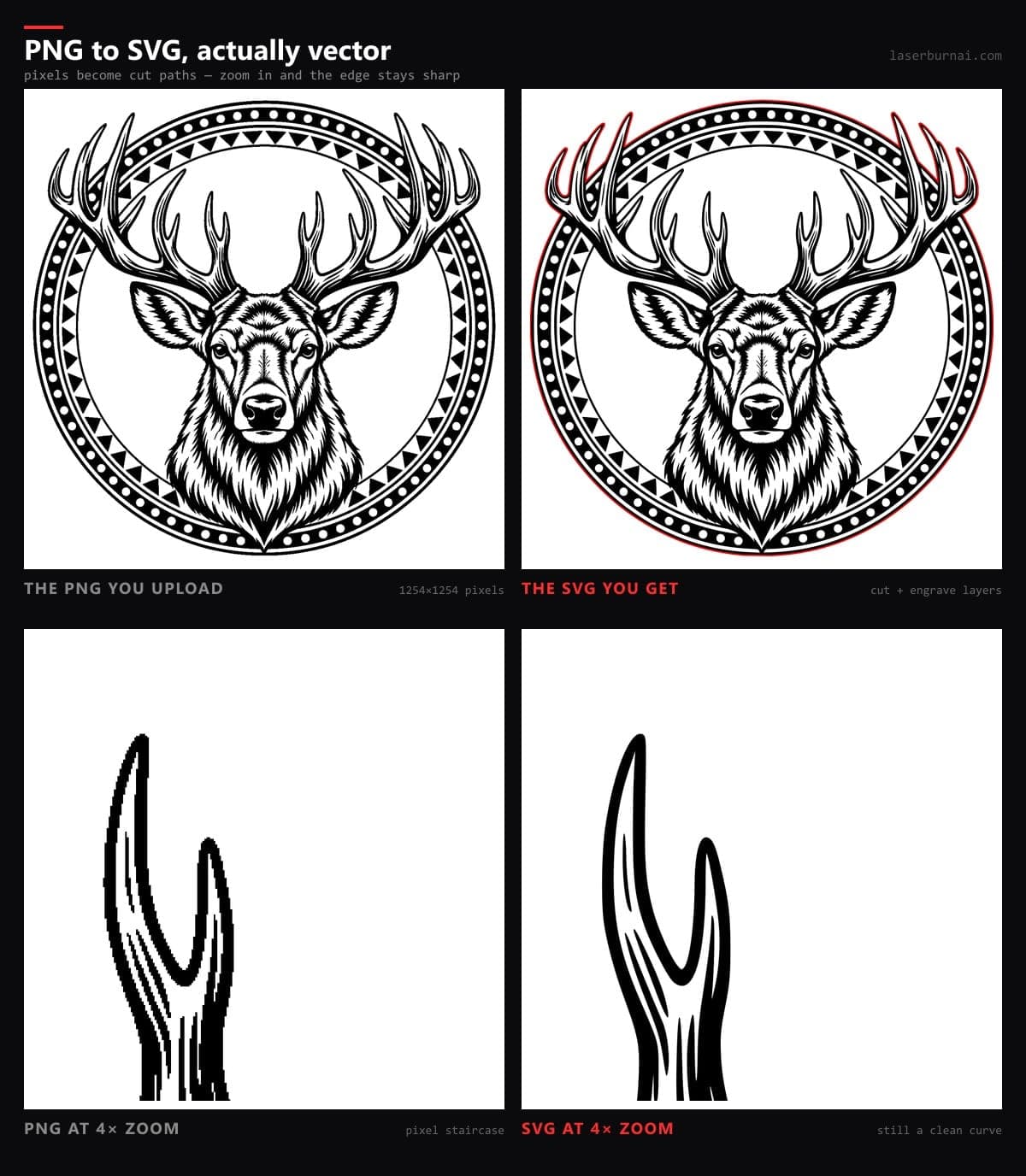
From flat image to layered cut file in one click
Generic PNG-to-SVG converters give you a single flat vector — fine for a website icon, useless on a laser, where cutting and engraving are different operations at different speeds and power. Our tracer was built for laser workflows: it finds the outer silhouette and renders it as a hairline red stroke (the cut), then converts the interior detail into a black fill layer (the engrave). Import the file and your software already knows what to do with each part.
It's the same hybrid tracing engine that powers our AI design generator — used on thousands of generations — running free on your uploads. If your source is a photograph rather than a graphic, use the AI Photo to Engrave converter, which restyles photos into engravable art before tracing.
Convert a color PNG to SVG
Switch the output to Color and the converter keeps your artwork's colors instead of reducing it to cut and engrave. It finds the real colors in the image (up to 10), snaps the anti-aliased edge pixels to them, and traces each color as a smooth vector shape. A white page background is dropped automatically, while white shapes inside the design stay.
Every color lands on its own named layer, and the shapes butt up against each other instead of stacking, so each layer is a complete, separate piece. Cricut Design Space and Silhouette treat it as a multi-color vinyl or HTV project, Inkscape and Illustrator open it with the layers ready, and on a laser you can cut each color from a different material for layered wood art. It's the quickest way to turn a colored logo into an SVG. Photos are the exception: they come out posterized, so use the Photo to Engrave converter for those.
Frequently asked questions
Is the PNG to SVG converter really free?+
Yes. Tracing uses no AI credits — sign in with Google and convert as many images as you like. Credits are only needed for AI design generation, which creates new artwork from a text description.
Can the converter keep my colors?+
Yes. Switch the output to Color and the SVG keeps your artwork’s colors, reduced to a clean palette of up to 10 flat colors, with each color on its own layer. A white page background is removed automatically. It works best on logos, clip art, and flat-color graphics, and the conversion runs entirely in your browser.
What kind of images convert best?+
High-contrast images: logos, clip art, line drawings, silhouettes, and black-and-white designs. Full-color photographs trace poorly — for photos, use our AI Photo to Engrave converter instead, which restyles the photo before tracing.
What is in the SVG I download?+
Two properly separated layers: a red-stroke vector cut outline around the design, and a black engrave layer for the interior detail. Laser software like LightBurn reads the layers separately so you can assign cut and engrave operations immediately.
Which laser software does the output work with?+
The SVG is standards-compliant and imports into LightBurn, RDWorks, xTool Creative Space, Glowforge, LaserGRBL, and Inkscape. Vector output scales to any size with no quality loss.
How is this different from Inkscape’s Trace Bitmap?+
Same idea, zero fiddling. Inkscape makes you tune thresholds, paths, and speckle settings per image. Our tracer runs a hybrid pipeline that produces a clean cut outline plus an engrave layer in one click — and it runs in your browser with nothing to install.
Can I convert JPG files too?+
Yes — PNG, JPG, and WebP all work. Transparent PNG backgrounds are treated as white.
Don't have artwork to convert?
Describe any design in plain English and our AI generates original artwork with the cut and engrave layers already separated — signs, monograms, wildlife, mandalas, anything.
Try the AI Design Generator →